Blog

  • Reel Mowers

    Aka Push/manual mowers

    After doing a bunch of research, this seems like the best option:
    http://www.homedepot.com/p/Ellison-Evolution-18-in-Easy-Push-Reel-Mower-with-Adjustable-Grass-Management-System-E2201-18/202811660#customer_reviews

    But, none are available.

    Other good options:
    http://www.lowes.com/pd_372120-37174-H2201-18_0__?productId=3606264&Ntt=reel+mower&pl=1&currentURL=%3FNtt%3Dreel%2Bmower&facetInfo=#BVRRWidgetID
    http://www.homedepot.com/p/Scotts-20-in-Reel-Mower-2010-20SG/202051457

    After all that, I’m not going to get one because it seems that
    1. It requires you to cut your lawn often (I don’t have time for that)
    2. Doesn’t do well with weeds or anything thicker than grass
    3. Can easily get “stuck” on mulch (which we have a ton of and ends up in the grass)

  • Local LAN while VPNed

    When not connected to VPN, I can access my home Local LAN. ipconfig and route look like this:

    http://gabe.misura.org/tmp/ipconfigAllNotConnectedToVPN.txt
    http://gabe.misura.org/tmp/routeWhileNotConnectedToVPN.txt

    When I connect to VPN, I can no longer connect to my home local LAN. ipconfig/route look like this:

    http://gabe.misura.org/tmp/ipconfigAllWhileConnectedToVPN.txt
    http://gabe.misura.org/tmp/routeWhileConnectedToVPN.txt

    Google suggested:
    http://superuser.com/questions/247852/rerouting-local-lan-and-internet-traffic-when-in-vpn
    I have not tried it just yet because it is not very clear from that example and my IP/routing settings what I should do.

    http://forums.speedguide.net/showthread.php?209167-Cisco-VPN-client-connects-but-restricts-LAN-access-even-when-option-is-ENABLED
    3rd post seems promising.

  • Rip DVD

    Of course I don’t suggest you should do this to avoid paying for something, but:

    Region locks are annoying! I want to play the DVD I paid for in the device connected to my TV
    Children are dangerous to DVDs. Rip, burn, save original.

    Handbreak seems like a decent option (though the UI is .. odd, clearly written by a mac user, HA!). The upgrade caused it to stop working (it used to rely on VLC, but now you download libdvdcss.dll separately and put that into the handbreak folder and bam!

    Links:

    Handbrake Windows 7 + 8 64-Bit DVD Ripping


    http://lifehacker.com/5809765/how-to-rip-a-dvd-to-your-computer
    http://lifehacker.com/5888078/vlc-20-breaks-handbrake-dvd-ripping-heres-how-to-fix-it

  • When to NAS

    We have a few pictures.
    I’ve been wanting to put the storage on a NAS but having a few external HDs seems fine.
    Well, after getting the latest external HD and connecting it and copying the data from one to another, ending up with ~4TB of data on 2 external drives, I noticed my machine was getting pretty slow. I looked at the memory usage and couldn’t figure out why a cold boot was using 2GB+ of RAM. Turns out, windows has to keep a metafile about all the storage that’s connected locally.

    I have 6GB of total RAM, but when the metafile eats a good 2GB of that, things can get sluggish quickly.

    This is the best argument for a NAS.

  • Charging for memory use you can’t control

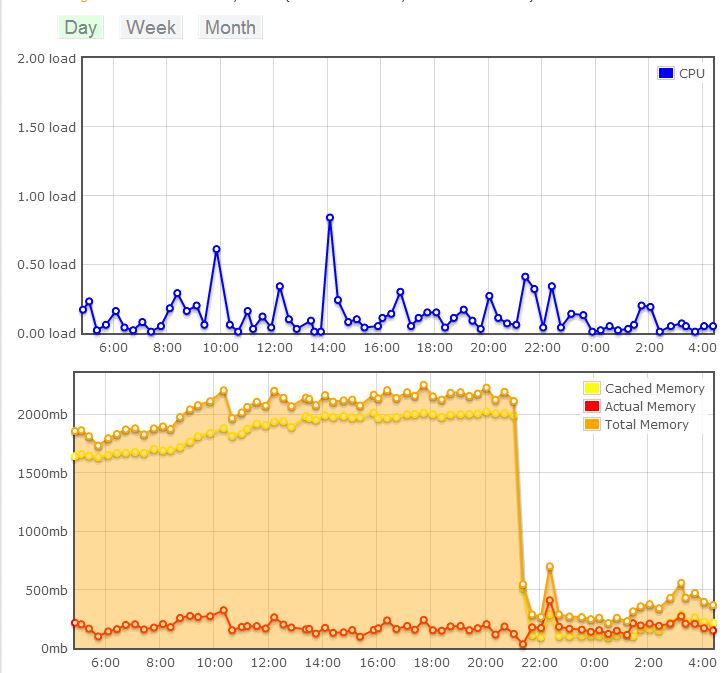
    So our hosting via Dreamhost was pretty bad on the shared account. Dreamhost suggested trying a free week of VPS (virtual Private server).

    I do that and come to find out the advertised price of $15/month only includes 300MB of memory.
    I set that and site gets restarted over and over for being over the limit.
    I chat with support and they give me a credit so I can set the limit to 4GB!
    Of course PHP FastCGI uses just about all the cache it can!

    I slowly lowered the memory from 4GB ($200/month!) down 800MB ($40/month). I still got a bounce notification due to using too much memory.

    dreamhostVPSmemoryUsage